
Manage webhooks
Koibox allows the use of webhooks to automate certain processes when certain actions occur. To do this, you must first register a webhook with Koibox, you can do it directly from the panel or from the API.
Manage webhooks from the panel
Section titled “Manage webhooks from the panel”You can access the webhooks panel from Settings > Webhooks.
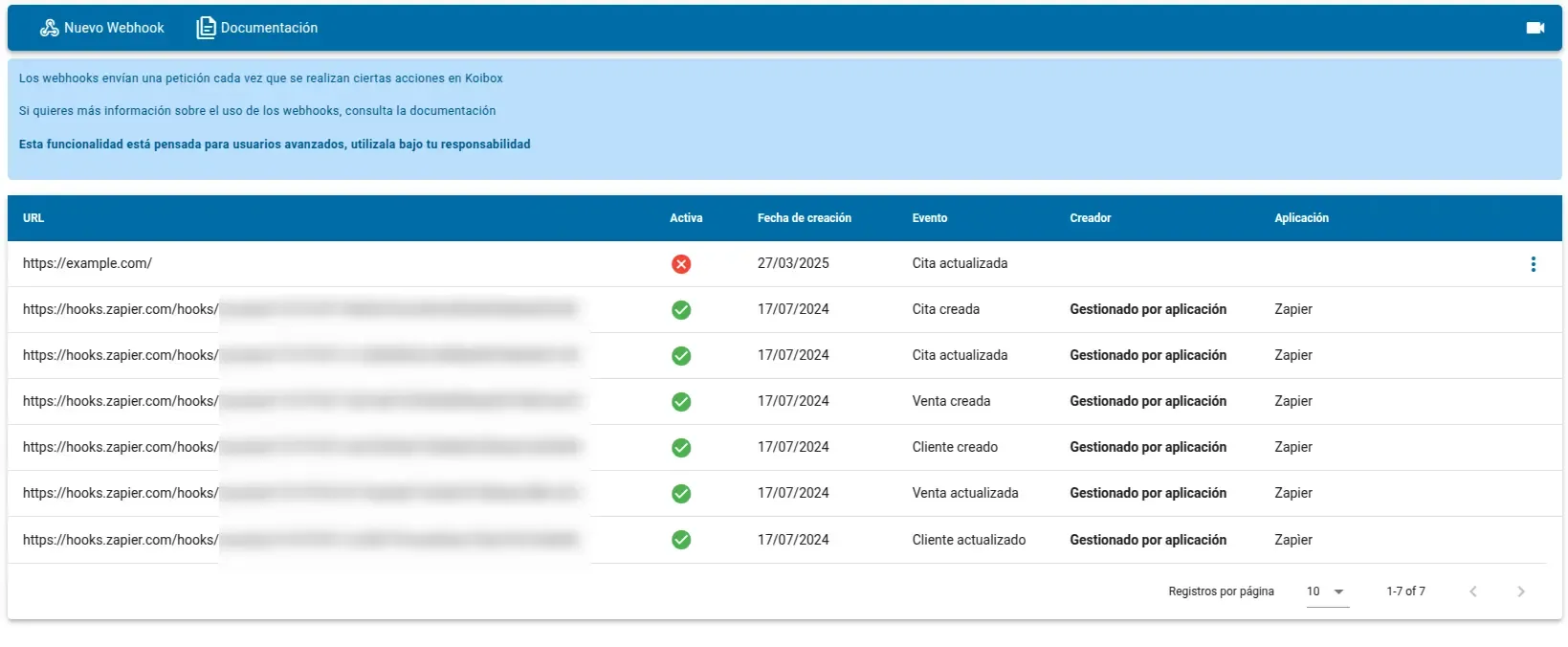
You can create new webhooks and activate, deactivate, or delete existing ones. You may not be able to manage all webhooks directly from here because an application has indicated that it manages it, in which case it can only be managed through the API.
Create a new webhook
Section titled “Create a new webhook”You can create a webhook from the New Webhook button, which will open a form for you to fill in the information about
it.
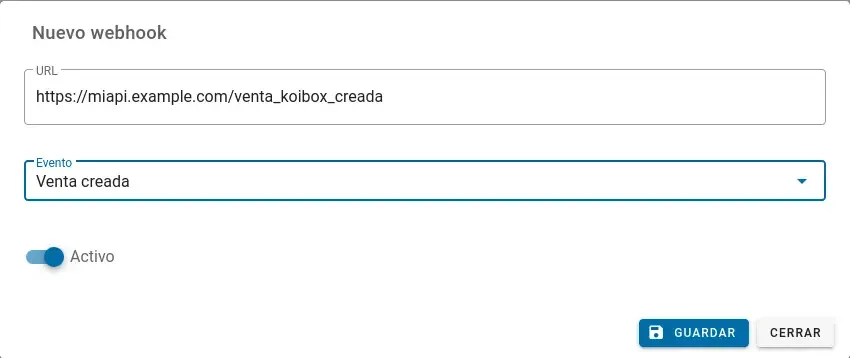
You just need to add the webhook URL, the event you want to listen to, and whether you want to leave it active upon creation.
Webhooks created from Koibox cannot be marked as managed by an application.
Manage existing webhooks
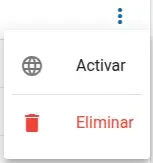
Section titled “Manage existing webhooks”If your webhook is not managed by an application, you can deactivate or delete it by clicking on the options menu to the right of each entry in the list.
Manage webhooks from your application
Section titled “Manage webhooks from your application”There are 4 endpoints to manage webhooks programmatically, they can be found in the API reference,
under the Webhook Management section.
Create a new webhook
Section titled “Create a new webhook”The request to create a webhook has the following structure:
{ "url": "https://example.com/webhook", "event": "CITA_CREATED", "is_active": true, "is_application_managed": true, "managing_application": "Mi aplicación"}You can
Unlike creating a webhook in the panel, you can specify that the webhook is managed by your application. If the webhook is indicated as application-managed, the options to manage it from the Koibox panel will be deactivated, which is useful when you want to prevent users from deactivating the webhooks, thus preventing the request from being sent.
Modify existing webhooks
Section titled “Modify existing webhooks”You can only activate or deactivate a created webhook; if you want to change the URL, the event, or whether the application manages it, you must recreate it.
With this in mind, the PATCH request is as follows:
{ "is_active": true}Delete webhooks
Section titled “Delete webhooks”There are two ways to delete a webhook:
Whenever possible, it is highly recommended to delete webhooks using their IDs. It is important to clarify that the ID is passed as part of the path, while the URL is passed as a query parameter.